
Appearance
Packing and delivery
Give each order to the person doing the work. Their packing and delivery screens focus on the assigned job and work on a phone.
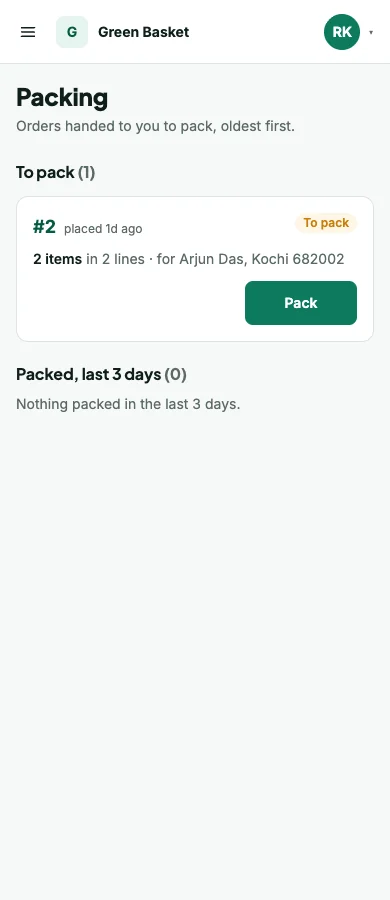
Pack an order
- An administrator or authorised colleague confirms the order and assigns packing.
- The packing person opens Packing and selects the order.
- Check the physical items as they go into the package.
- Mark the order packed and confirm the action.
If items are unchecked, the screen identifies them and asks before Pack anyway. The history records that choice. Services in a mixed order are not physical items to pack.
Hand over for delivery
Assign a delivery person from the order. Their run separates orders ready to deliver from those waiting for packing. Opening an assigned delivery takes them to the doorstep screen rather than the full staff order page.
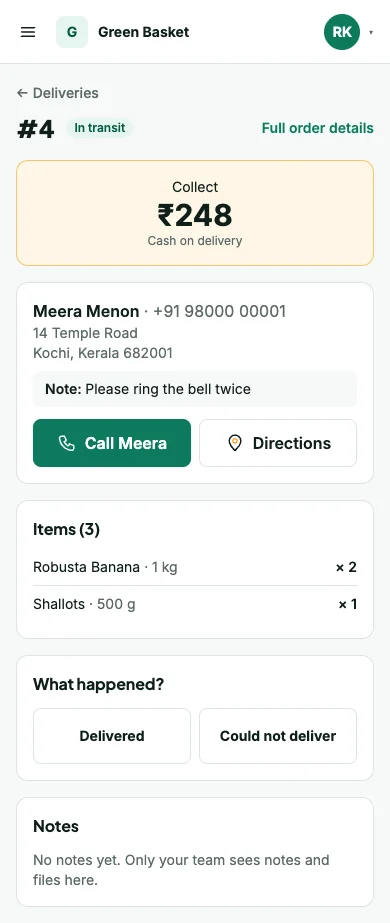
At the door
Use Call and Directions when the address provides those details. The shopper may include a Google Maps pin. Check the items, then choose the outcome.
- Delivered asks for confirmation. For COD, record the full collection and its mode.
- Could not deliver needs a reason. It records an attempt and keeps the delivery available for the next attempt.
When offered, add a delivery photo, a file or a voice note to explain the outcome. Allow camera or microphone access on the device. A voice recording stops at two minutes; recordings shorter than a second are refused.
A delivery person cannot record someone else's assigned job merely by opening its address. An administrator with the relevant permission can manage other deliveries.
Cash handover
When cash is handed back, the administrator records who paid it in, the amount counted and any short/over amount with a note. This is a handover of collected cash, not a second sale. Check collections in Reports.